Best AI Video Generators in 2026: 13 Tools Compared
14 min read
The best AI video generators of 2026 compared: pricing, free tiers, clip length and resolution for imageat, trendai.video, Kling, Veo, Runway and more.
Try imageat free →
On this page
- Quick picks
- How we compared them
- 1. imageat: best all-in-one AI video generator
- 2. trendai.video: best for viral trend videos from a photo
- 3. Kling AI: best for long single takes
- 4. Google Flow (Veo and Gemini Omni Flash): best free daily credits
- 5. Runway: best all-in-one creative suite
- 6. Higgsfield: best for cinematic presets and ads
- 7. Hailuo AI (MiniMax): best price per second for realism
- 8. Pika: best for cheap fast drafts
- 9. Luma: best for HDR and pro pipelines
- 10. PixVerse: best free tier with templates
- 11. Dreamina (CapCut): best daily allowance for Seedance
- 12. Vidu: best for anime and multi-reference
- 13. Hedra: best for talking characters
- What happened to Sora?
- How to choose
- FAQ
- What is the best AI video generator in 2026?
- Which AI video generator is free?
- Which AI video generator makes the longest clips?
- Is Sora still available?
- Can I use AI videos commercially?
- Do credits roll over?
AI video changed a lot in 2026. Native audio is now standard on the top models. Clips that used to stop at 5 seconds now run for 15 to 30 seconds. And OpenAI's Sora, one of the best-known names in the category, is gone: the Sora app closed on April 26, 2026 and the API on September 24, 2026.
So the question isn't "which model is best?" any more. It's which tool gets you a finished, postable video for the least money and effort. This guide compares 13 AI video generators on what matters when you're paying: price, free allowance, clip length, resolution and what each one is actually good at.
Every price and spec below comes from the tool's own pricing page or documentation, checked in November 2026, with sources at the end. Prices change often, so check the live page before you subscribe.
Disclosure: Viral Trend Video is run by the team behind imageat and trendai.video, which are ranked #1 and #2 below. We explain why, and we list their limits as well as their strengths. Every other tool is described from its own published pricing and specs.
Quick picks
| # | Tool | Best for | Starting paid price | Free option | Max clip length (top model) |
|---|---|---|---|---|---|
| 1 | imageat | Every top model in one studio, plus trends, images and audio | $9.99/mo (Starter, 100 credits) | Sign-up is free; pay per generation | Up to 30 s (Kling 4.0, Seedance 2.5) |
| 2 | trendai.video | Photo-to-trend videos for TikTok, Reels and Shorts | $9.99/week (2,000 credits) | No free plan listed | Up to 30 s (Seedance 2.5, Wan 3.0) |
| 3 | Kling AI | Long single takes with native audio | $8.80/mo (Standard, 660 credits) | Basic plan, limited | 3–30 s (Kling 4.0) |
| 4 | Google Flow (Veo, Omni Flash) | Free daily credits from Google | $4.99/mo (AI Plus) | 50 credits a day | Up to 15 s (Omni Flash 1.2, paid) |
| 5 | Runway | An all-in-one creative suite and editor | $15/mo ($12 billed yearly) | 125 one-time credits | 2–10 s (Gen-4.5) |
| 6 | Higgsfield | Many models plus ad and cinema presets | $19/mo (Starter, 270 credits) | Free account, 0 credits | Model-dependent |
| 7 | Hailuo AI (MiniMax) | Realistic motion at a low price per second | About $10.50/mo (Standard) | One-time welcome credits | 4–15 s (MiniMax H3) |
| 8 | Pika | Cheap fast drafts with its own models | $10/mo ($8 billed yearly) | Free plan | Model-dependent |
| 9 | Luma | Pro-grade HDR video and per-second pricing | $30/mo ($25 billed yearly) | No free plan listed | 5 or 10 s (Ray3.2) |
| 10 | PixVerse | Templates, effects and daily free credits | $10/mo ($8 billed yearly) | 60 credits + 30 a day | 1–15 s (V6) |
| 11 | Dreamina (CapCut) | Seedance with a generous US daily allowance | $15/mo (Basic) | 120 credits a day (US) | Up to 30 s (Seedance 2.5) |
| 12 | Vidu | Anime-style and multi-reference clips | Paid plans on vidu.com | Sign-up and daily login credits | Up to 16 s (Q3) |
| 13 | Hedra | Talking characters and avatars | $20/mo (Basic) | No free plan | Model-dependent |


 Kling AI
 Google Flow (Veo, Omni Flash)
 Runway
 Higgsfield
 Hailuo AI (MiniMax)
 Pika
 Luma
 PixVerse
 Dreamina (CapCut)
 Vidu
 Hedra
How we compared them
We didn't rank on hype or on one viral clip. We looked at five things:
- Cost per usable clip. Credits mean different things on every platform, so we read each tool's own credit table.
- Free allowance. One-time credits, daily credits, or none at all.
- Length and resolution of the best model each tool offers.
- Workflow. Can you go from idea to a finished vertical video without three other apps?
- Model choice. One model family, or several under one balance.
For raw model quality we used the public Artificial Analysis Video Arena, which ranks models by blind human votes. On November 13, 2026 it had Alibaba's Wan 3.0 first for text-to-video with audio and ByteDance's Seedance 2.5 first for image-to-video. Both are available inside our top two picks.
1. imageat: best all-in-one AI video generator
imageat calls itself an agentic AI photo and video generator, and the important word is all. Instead of locking you into one model, it puts the leading video models side by side under one credit balance: Kling 4.0, Seedance 2.5, Wan 3.0, Google's Gemini Omni Flash 1.2, FLUX 3 Max, MiniMax H3 Max, Veo 3.1 and more. That matters in 2026, because the "best" model changes every few months and depends on the shot.
What you can make:
- Text-to-video and image-to-video in the AI video studio. Kling 4.0 and Seedance 2.5 go up to 30 seconds in one take. Gemini Omni Flash 1.2 makes 3–15 second clips with native audio at up to 4K.
- Viral trends: a library of ready-made AI photo and video trends (501 listed when we checked), where you upload a photo and get the trend back.
- Trend Studio: remix proven TikTok and Instagram formats (slideshows, hook + demo, wall of text, green-screen memes) for your brand at 8 credits a remix.
- Images (Nano Banana, GPT Image, Midjourney V8, Seedream and others), audio tools, an API and an MCP connector.

Pricing: Starter is $9.99/month for 100 credits, Pro $29.99 for 340 credits, Premium $49.99 for 530 credits, and Business $99.99 per seat. Every plan adds free monthly images on its fast image models, and failed generations aren't charged.
- Pros: the widest model choice we found in one place; trends, images, audio and video in one account; commercial usage rights and watermark-free exports on paid plans; no charge for failed generations.
- Cons: no free credit allowance for video; premium models use credits fast, so check the price on the Generate button.
- Best for: creators and marketers who want to try every top model without five subscriptions.
2. trendai.video: best for viral trend videos from a photo
trendai.video does one thing and does it fast: pick a viral TikTok, Reels or Shorts trend, upload a photo, get a ready-to-post video. You don't write prompts. The site lists 600+ trends, 1,000+ effects and 200+ UGC creators, and its trend template library had 636 templates when we checked, sorted into categories like Holiday & Events, Pets & Animals, Fantasy & Magic and Transformations.
When you do want a prompt, its AI video generator runs Seedance 2.5 (up to 30 s with native audio), Wan 3.0 (1080p, up to 30 s), FLUX 3 Max and MiniMax H3 Max from one balance, with the credit price shown before you generate.
Pricing: Weekly $9.99 (2,000 credits), Monthly $29.99 (5,000 credits) or Yearly $249.99 (25,000 credits). One-time credit packs start at 5,000 credits for $39.99 and never expire. Failed generations refund automatically.
- Pros: the shortest path from photo to trending video; a weekly plan for one-off projects; pack credits that don't expire; clear responsible-use rules (your own photos, or photos of people who agreed).
- Cons: built for short social content, not long cinematic edits; no free plan listed.
- Best for: TikTok, Reels and Shorts creators who want to jump on a trend today.
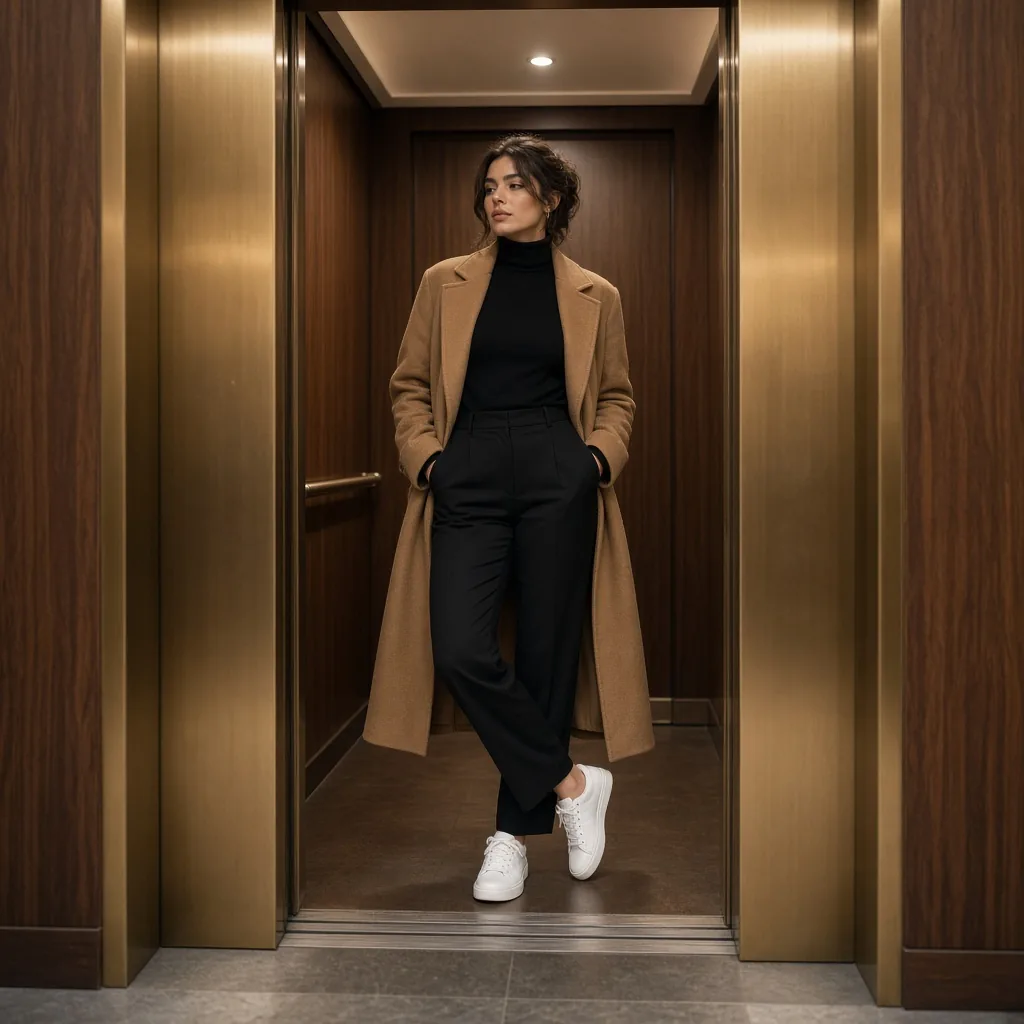
Want to see which trends are hot right now? Browse our trend tracker, for example Dance with Santa or Elevator Outfit Change.
3. Kling AI: best for long single takes
Kling 4.0 is one of the most capable single models available. Kling's own guide lists 3–30 second generations, 720p/1080p/4K output, 10-bit HDR at 1080p and 4K, native stereo audio, up to 10 keyframes and up to 10 reference images.
Pricing: Standard is $8.80/month ($79.20/year) for 660 credits, Pro is $293.04/year for 3,000 credits a month, and Premier is $728.64/year for 8,000 a month. The free Basic plan gives limited access.
- Pros: long takes, strong motion, lots of control (keyframes, references, video editing).
- Cons: one model family; credits expire monthly; Kling doesn't publish a fixed credit rate for 4.0, so you check it on the Generate button.
- Best for: people who mostly want Kling and the lowest price for it.
4. Google Flow (Veo and Gemini Omni Flash): best free daily credits
Google's Flow gives everyone 50 credits a day, with or without a subscription. Paid Google AI plans add monthly credits: 200 on AI Plus ($4.99), 1,000 on AI Pro ($19.99), and 10,000 or 25,000 on the two Ultra tiers ($99.99 / $199.99).
Be aware of the model shuffle: Veo 3.1 Fast and Veo 3.1 Quality retire on December 5, 2026, leaving Veo 3.1 Lite (720p, 4/6/8 s, 10 credits a clip on non-Ultra plans) and the newer Gemini Omni Flash 1.2. Free users can't always generate video during peak hours (roughly 2–5 PM UTC).
- Pros: real free daily usage; cheap entry plan; Google's newest models.
- Cons: models are changing; peak-hour limits on free accounts; 1080p/4K upscaling depends on plan.
- Best for: trying AI video at no cost, or as a cheap add-on if you already pay for Google AI.
5. Runway: best all-in-one creative suite
Runway is a full creative platform: its own Gen-4.5 and Aleph 2.0 models, third-party models such as Kling 4.0 and Seedance 2.0 Pro, music and voice, an ads tool and app builder. Gen-4.5 makes 2–10 second clips at 720p for 12 credits per second.
Pricing: Free (125 one-time credits), Standard $15/month ($12 yearly, 625 credits), Pro $35 ($28 yearly, 2,250 credits), Max $95 ($76 yearly, 9,500 credits, one month of rollover).
- Pros: mature editor and tools; 4K upscaling and no watermark on paid plans; strong for teams.
- Cons: Gen-4.5 outputs 720p and caps at 10 seconds; credits go fast on premium models.
- Best for: filmmakers and agencies who want editing and generation in one place.
6. Higgsfield: best for cinematic presets and ads
Higgsfield bundles many image and video models with its own tools: Cinema Studio, Ads Studio, Short Drama, Shorts, Canvas and an MCP server. It often runs "Unlimited" promotions on selected models for Plus and Ultra subscribers.
Pricing (US, November 2026): Starter $19/month (270 credits), Plus $59/month or $47 billed yearly (1,200 credits), Ultra $129/month or $99 billed yearly (3,000 credits). The free account has no monthly credits. Subscription credits don't roll over.
- Pros: lots of models and presets; frequent unlimited promos.
- Cons: Starter excludes some top models; unlimited modes have length and resolution caps and run in a shared queue.
- Best for: ad creatives who like preset camera moves. See our full Higgsfield alternatives guide.
7. Hailuo AI (MiniMax): best price per second for realism
MiniMax H3, released July 31, 2026, makes 4–15 second clips with native sound at 768p or 2K. It ranks near the top of the blind-vote arena and is one of the cheapest frontier models per second.
Pricing: new accounts get a one-time welcome pack that expires after three days, with watermarked downloads. Paid plans start around $10.50/month for 1,000 credits (Standard) and go up to Max; the full table now needs a login, so confirm at checkout.
- Pros: realistic motion, low cost per second.
- Cons: no recurring free credits; prices shown as discounts that change.
- Best for: budget realism. You can also run MiniMax H3 Max inside imageat or trendai.video.
8. Pika: best for cheap fast drafts
Pika now runs its own models (Pika H3 Flex, Pika 2.5) next to Seedance 2.5, Kling 4.0, Veo 3.1, Wan 3.0 and others. Pricing: Free; Starter $10/month ($8 yearly, 600 credits); Creator $35 ($28 yearly, 2,600 credits); Fancy from $95 ($76 yearly). A 5-second Pika H3 Flex clip is 10 credits.
- Pros: very cheap drafts; all models on every plan.
- Cons: top-up credits don't work in the API or iOS app.
- Best for: iterating on ideas quickly.
9. Luma: best for HDR and pro pipelines
Luma's Ray3.2 does text/image-to-video in 5 or 10 second clips up to 1080p, with HDR and EXR output, plus video-to-video and reframing. Pricing: Plus $30/month ($25 yearly, 10,000 credits, commercial use), Pro $90 ($75 yearly), Ultra $300 ($250 yearly). No free plan is listed.
- Pros: HDR/EXR for post-production; every cost published per second.
- Cons: no free tier; 1080p Ray clips are expensive (400 credits for 5 s).
- Best for: studios and colorists.
10. PixVerse: best free tier with templates
PixVerse's free Basic plan gives 60 initial credits plus 30 daily credits. PixVerse V6 makes 1–15 second clips up to 1080p with optional audio and multi-shot. Pricing: Standard $10/month ($8 yearly, 1,200 credits, up to 720p), Pro $30 (6,000 credits), Premium $60 (15,000 credits).
- Pros: daily free credits; templates and effects.
- Cons: Standard caps at 720p; "unlimited" applies only to specific models.
- Best for: casual creators who post often.
11. Dreamina (CapCut): best daily allowance for Seedance
Dreamina gives US free accounts 120 credits a day and runs ByteDance's Seedance models. Basic is $15/month for 1,575 credits, with watermark-free downloads on paid plans.
- Pros: generous daily credits in the US; ties into CapCut.
- Cons: allowance varies by region; free downloads are watermarked.
- Best for: CapCut users.
12. Vidu: best for anime and multi-reference
Vidu Q3 makes clips up to 16 seconds with synchronized audio at 540p, 720p or 1080p. New users get trial credits, and you earn credits by logging in daily. Vidu says it doesn't give refunds.
- Pros: strong 2D animation and reference consistency; off-peak mode.
- Cons: no refunds; free exports carry Vidu branding.
- Best for: anime-style shorts.
13. Hedra: best for talking characters
Hedra focuses on character video: give it a face and a voice and it animates speech. Pricing: Basic $20/month (2,000 credits), Pro $50 (7,200 credits, commercial use), Ultra from $100. There's no free plan.
- Pros: purpose-built for dialogue and avatars.
- Cons: no free tier; commercial use starts on Pro.
- Best for: explainers and talking-head content. Use your own face or a fully fictional character.
What happened to Sora?
OpenAI discontinued the Sora web and app experience on April 26, 2026 and shut down the Sora 2 API on September 24, 2026. No ChatGPT plan includes video generation now. If you're looking for a replacement, read our Sora alternatives guide.
How to choose
- You post trends on TikTok or Reels: start with trendai.video, then read our TikTok trend video guide.
- You want every model and more control: imageat.
- You want to animate a still photo: see best image-to-video generators.
- You want free: Google Flow, PixVerse or Dreamina daily credits.
- You edit long-form or work in a studio: Runway or Luma.
Before you generate, grab a tested prompt from our prompt library or see which models each trend works best with.
FAQ
What is the best AI video generator in 2026?
For most creators, a multi-model platform beats a single model, because the top model changes every few months. imageat gives you Kling 4.0, Seedance 2.5, Wan 3.0 and Gemini Omni Flash 1.2 in one place. For trend videos from a photo, trendai.video is faster.
Which AI video generator is free?
Google Flow gives 50 credits a day, PixVerse gives 60 credits plus 30 a day, and Dreamina gives US accounts 120 credits a day. Runway gives 125 credits once. Free outputs are often watermarked or limited in resolution.
Which AI video generator makes the longest clips?
Kling 4.0, Seedance 2.5 and Wan 3.0 all go up to 30 seconds in one generation. All three are available on imageat, and Seedance 2.5 and Wan 3.0 are on trendai.video.
Is Sora still available?
No. OpenAI closed the Sora app on April 26, 2026 and the API on September 24, 2026.
Can I use AI videos commercially?
It depends on the plan. Most tools grant commercial rights only on paid plans (for example Pika Creator, Hedra Pro, Luma Plus and imageat's paid plans). You still need rights to anything you upload, like photos of people.
Do credits roll over?
Usually not. Runway Max rolls over one month; Higgsfield, Kling and Hedra reset monthly. One-time credit packs on trendai.video, imageat and PixVerse don't expire.