Santa Caught on Camera
From one photo of your own porch, hallway or living room, Santa appears on night-vision 'security camera' footage, leaves presents, looks into the lens and waves. AI Santa-cam clips started on 29 October 2026, and doorbell versions where Santa says a child's name followed in early November.
Santa Caught on Camera is an AI video trend tracked on Viral Trend Video. Below you will find the steps to make it, answers to common questions and related trends.
First seen: ·Updated:
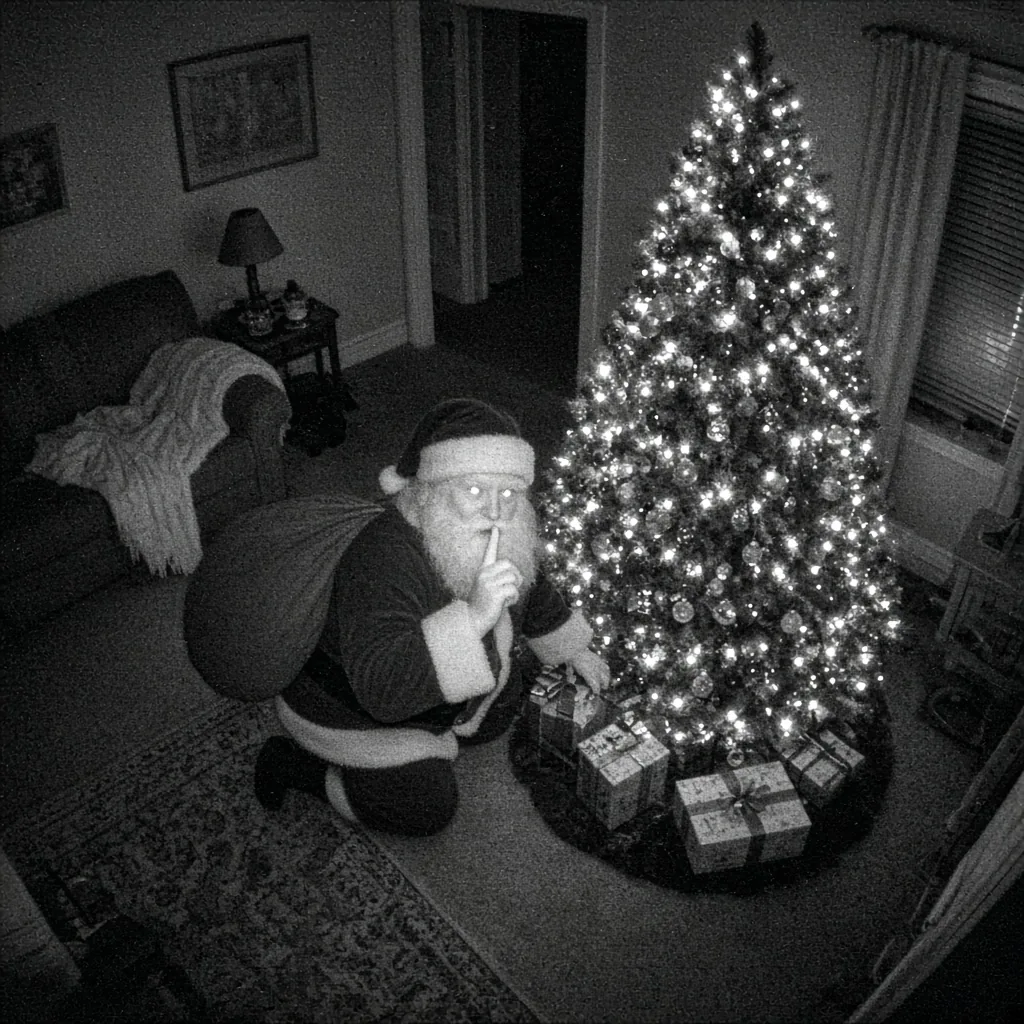
Radar. A new trend we are tracking. There is no featured video yet (the image is an illustration of the effect), so this page gives the description, an original prompt and the steps to make it. Seen on TikTok.
What you’ll need
- A model: an AI image-to-video model that accepts a reference photo
- A reference photo of your own
The prompt
Original prompt written for this page. Replace the [bracketed] parts with your own photo or subject.
Animate [YOUR ROOM PHOTO] as grainy black-and-white night-vision security camera footage from a high corner, with a running timestamp look but no readable text. The room stays exactly as in the photo. A jolly fictional Santa with a sack walks in from the side, places two wrapped presents under the tree (or by the door), notices the camera, smiles, puts a finger to his lips and waves before walking out. Slight camera noise and infrared glow. No other people.
Seedance-style timeline: if your model reads time ranges, split the video prompt like this. 0–3s: empty room. 3–6s: Santa enters and leaves presents. 6–10s: he looks into the camera, shushes and waves.
Use it safely: Use photos of your own home only, with no people or house numbers visible. Say it is AI-made when you post it publicly.
How it’s made
- Tool
- Image-to-video model (for example Seedance, Kling or Veo)
- You need
- One photo of your own room, porch or front door (no people in it)
- Result
- 8–10 seconds
- Take a wide photo of your room or porch from a high angle, like a security camera.
- Upload it to an image-to-video model and paste the prompt.
- Render a few takes and keep the one where the room does not change shape.
- Add a quiet room-tone sound and show it to the family.
Two tips
- Turn on a lamp or the tree lights in your photo so the night-vision look has some glow.
- If you want a spoken name, add it in your editor with your own voice-over rather than asking the model.
Common mistake
The furniture morphs when Santa walks past. Keep the camera fixed and say 'the room stays identical to the photo'.
Frequently asked questions
What is Santa Caught on Camera?
From one photo of your own porch, hallway or living room, Santa appears on night-vision 'security camera' footage, leaves presents, looks into the lens and waves. AI Santa-cam clips started on 29 October 2026, and doorbell versions where Santa says a child's name followed in early November. First seen: Oct 29, 2026.
How do I make Santa Caught on Camera?
1. Take a wide photo of your room or porch from a high angle, like a security camera. 2. Upload it to an image-to-video model and paste the prompt. 3. Render a few takes and keep the one where the room does not change shape. 4. Add a quiet room-tone sound and show it to the family.
Can I use my own photo for Santa Caught on Camera?
Yes. This trend is built around your own photo: From one photo of your own porch, hallway or living room, Santa appears on night-vision 'security camera' footage, leaves presents, looks into the lens and waves.
Which AI model should I use for Santa Caught on Camera?
We have no verified best-model pick for this trend. Use an AI image-to-video model that accepts a reference photo and check the model's current terms and pricing yourself.
Is Santa Caught on Camera still trending?
It is on the Viral Trend Video radar: a new trend we are tracking, with no rating yet. First seen Oct 29, 2026 on TikTok. Radar is a tracking label, not a measured popularity score.
Where can I see more AI video trends like Santa Caught on Camera?
Browse the full board on Viral Trend Video. Related trends: Santa's Nice List Gold Frame, Dance With Santa, Christmas Sweater Color Pop Portrait.
Santa's Nice List Gold FrameDance With SantaChristmas Sweater Color Pop PortraitFull board
What prompt can I use for Santa Caught on Camera?
Animate [YOUR ROOM PHOTO] as grainy black-and-white night-vision security camera footage from a high corner, with a running timestamp look but no readable text. The room stays exactly as in the photo. A jolly fictional Santa with a sack walks in from the side, places two wrapped presents under the tree (or by the door), notices the camera, smiles, puts a finger to his lips and waves before walking out. Slight camera noise and infrared glow. No other people. (original prompt written for this page; replace the [bracketed] parts with your own photo or subject.)
What do I need?
One photo of your own room, porch or front door (no people in it)
What's the most common mistake?
The furniture morphs when Santa walks past. Keep the camera fixed and say 'the room stays identical to the photo'.
Updated
More christmas trends



More from October 2026
All of October 2026 →Get the daily digest
New and shifting trends by email. No account needed. Prefer feeds? RSS · JSON
Sponsored Digest sponsor line: Your brand here (open slot)