 Viral Trend Video
Renaissance Anatomical Study of a Flamingo
A concise prompt for generating an image in the style of a Renaissance anatomical study. It specifies the subject as a flamingo standing on one leg, rendered using fine graphite and ink cross-hatching, with transparent tissue overlays showing bone and muscle structure, all on yellowing parchment paper.
Renaissance Anatomical Study of a Flamingo is a free Image models infographic prompt. Copy it, swap in your own details.
Published: ·Prompt for: Image models
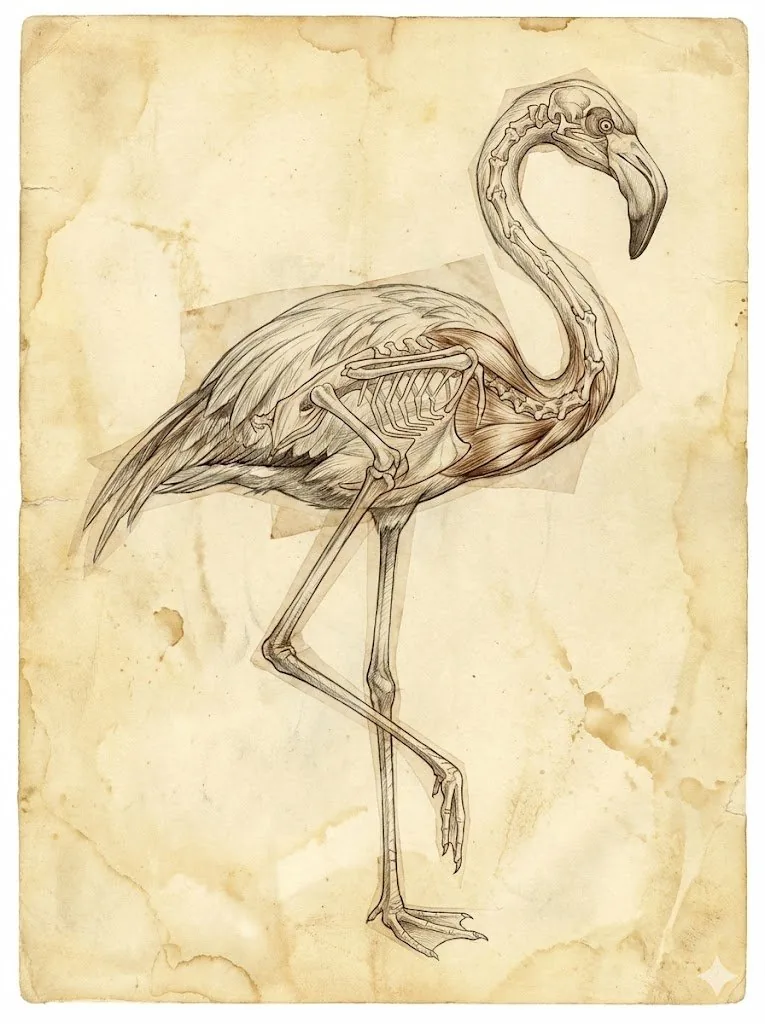
The full prompt
Composition: {argument name="subject" default="flamingo, standing on 1 leg"}

Art style: A Renaissance anatomical study
- illustrated with fine graphite and ink cross-hatching
- layered with transparent tissue overlays showing bone and muscle
- on yellowing/ greying parchment paper

Avoid:
- Do not draw the subject twice - *only once*
- Do not skip some body parts - be complete
- No text at all

Aspect ratio: 3:4
Have it running in three steps
- Open Image models or the image model you already use.
- Paste the prompt above.
- Generate a few versions and keep the best one.
What you’ll need
- A model: Image models
- The prompt on this page (use the Copy button)
The whole process
- Open Image models, or the image model you already use.
- Copy the prompt with the Copy button.
- Paste it in and generate a few versions.
- Keep the best result and tweak one detail at a time.
What’s in this prompt
It is a infographic prompt for Image models, 416 characters long.
Frequently asked questions
What is the Renaissance Anatomical Study of a Flamingo prompt?
A concise prompt for generating an image in the style of a Renaissance anatomical study. It specifies the subject as a flamingo standing on one leg, rendered using fine graphite and ink cross-hatching, with transparent tissue overlays showing bone and muscle structure, all on yellowing parchment paper. It is a infographic prompt written for Image models.
How do I use the Renaissance Anatomical Study of a Flamingo prompt?
1. Open Image models, or the image model you already use. 2. Copy the prompt with the Copy button. 3. Paste it in and generate a few versions. 4. Keep the best result and tweak one detail at a time.
Which AI model is it for?
It is listed for Image models. We have not verified it on other models.
Is the prompt free to copy?
Yes, you can copy the prompt text from this page and use it in Image models at no cost. Check the terms and pricing of the model you run it in.
When was it added?
It has been listed on Viral Trend Video since Jan 23, 2026. The example image above shows a result for this prompt.
How long is the prompt?
416 characters, about 67 words.
Where can I find more Image models prompts?
Browse all prompts on Viral Trend Video. Related: Chalkboard-style AI news summary, Educational Commodity Universe Diorama, Product Ingredient Labeling.
Chalkboard-style AI news summaryEducational Commodity Universe DioramaProduct Ingredient LabelingAll prompts
Published
More Image models prompts

Get the daily digest
New and shifting trends by email. No account needed. Prefer feeds? RSS · JSON
Sponsored Digest sponsor line: Your brand here (open slot)